

Uncategorized
GeoJSON File Format Explained: What Is a GeoJSON File, Feature Collections, and Point‑Line‑Polygon Examples
May
A GeoJSON file is a JSON document that encodes geospatial data—locations, shapes, and attributes—in a structured, human‑readable way. It fits naturally into modern development because it is just JSON with spatial rules, making it ideal for web maps, APIs, and data pipelines.
Common geospatial file types (quick context)
Geospatial formats fall into three broad categories: vector formats for discrete features, raster formats for imagery and continuous surfaces, and container/database formats that bundle multiple layers.
Key vector formats
-
Shapefile (.shp + sidecar files)
A long‑time GIS workhorse that actually consists of several files:.shpfor geometry,.shxfor indexing,.dbffor attributes, and often.prjfor projection. It is widely supported but binary, multi‑file, and limited in schema flexibility. -
GeoJSON (.geojson / .json)
A text‑based format that stores geometry and attributes together in a single JSON document. It is human‑readable, easy to version, and deeply compatible with web technologies. -
KML (.kml)
An XML‑based format used heavily with Google Earth and related tools. It supports features, styles, and overlays but is more verbose and less convenient in JSON‑centric stacks. -
GeoPackage vector (inside .gpkg)
Vector layers stored inside a SQLite‑based container. It is compact and powerful but binary rather than plain text.
Raster and container formats
-
GeoTIFF (.tif / .tiff) and JPEG/PNG with world files represent imagery and surfaces.
-
File Geodatabase (.gdb) and GeoPackage (.gpkg) act as containers for many vector layers, rasters, and rules.
-
Geospatial PDF embeds geographic information inside PDFs for map viewing.
These formats are important, but they were mostly designed around desktop GIS and proprietary environments. GeoJSON’s niche is lightweight, interoperable vector data that moves easily through web and API environments.
What is in a GeoJSON file?
At its core, a GeoJSON file is a JSON object with at least a type field. The top level is usually one of:
-
"Feature"– a single feature (one geometry plus its properties) -
"FeatureCollection"– a collection of features (the most common pattern) -
A bare geometry (
"Point","LineString","Polygon", etc.)
Every geometry object has:
-
"type"– one ofPoint,LineString,Polygon, etc. -
"coordinates"– an array of numbers or arrays whose structure depends on the geometry type.
Every feature has:
-
"type": "Feature" -
"geometry"– a geometry object (ornull) -
"properties"– an object with any key–value pairs you want (names, codes, counts, flags, etc.) -
Optional
"id"– a unique identifier.
Coordinates are given as [longitude, latitude], optionally with a third value for elevation, and the default coordinate system is WGS84.
What is a FeatureCollection?
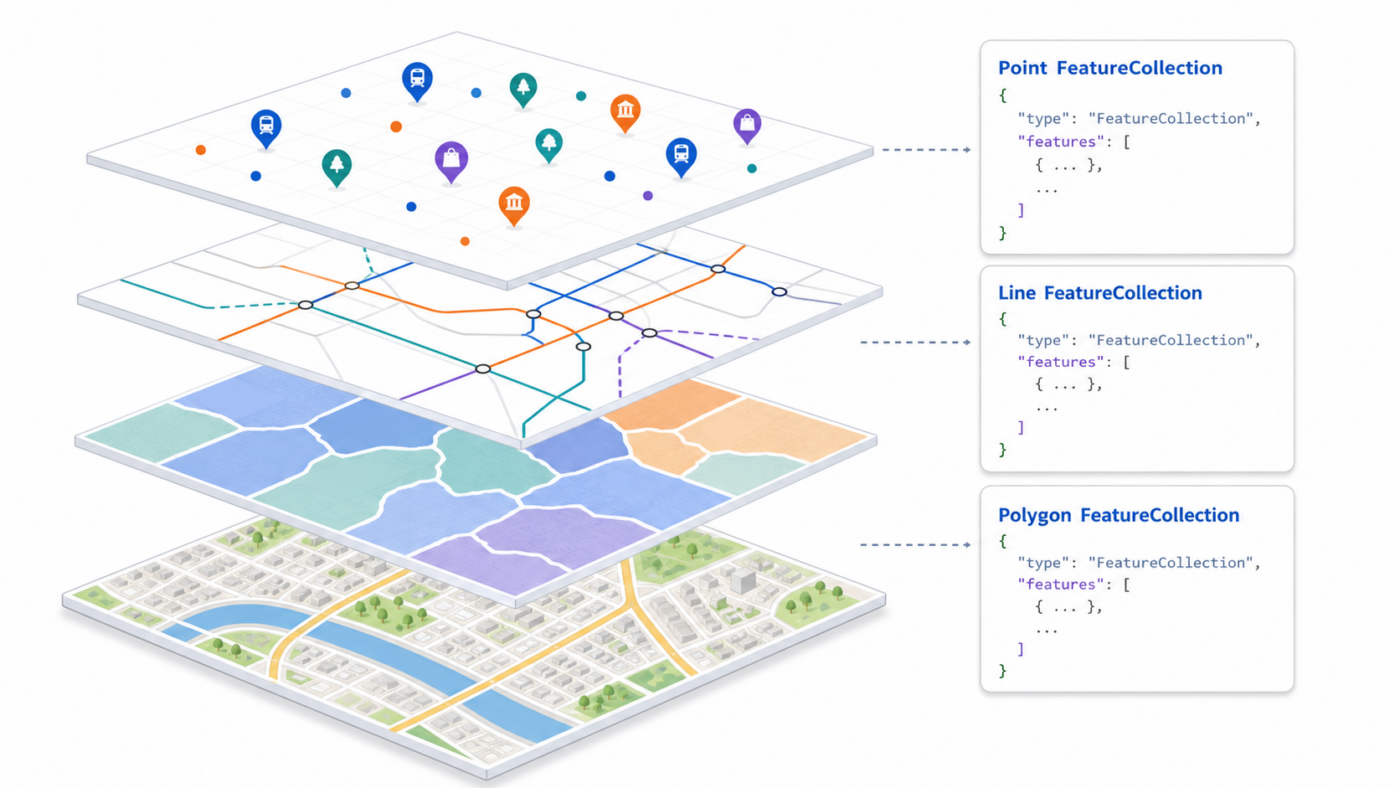
A FeatureCollection is a GeoJSON object that groups many features into one logical dataset. It is the structure you will use most of the time when you store or exchange a layer of geospatial data.
A FeatureCollection has:
-
"type": "FeatureCollection"at the top level -
"features"– an array of Feature objects
You can think of a FeatureCollection as “a list of features that belong together” — for example, all stations in a city, all road segments of a network, or all polygons representing districts. In practice, you almost always work with FeatureCollections of points, lines, and polygons. There are also multi‑geometries (MultiPoint, MultiLineString, MultiPolygon), but for many day‑to‑day tasks, plain points, lines, and polygons are enough.
Below are full GeoJSON examples of FeatureCollections for each geometry type.
Point FeatureCollection example
This is a complete GeoJSON file representing several train stations as point features.
json
{
  "type": "FeatureCollection",
  "name": "tokyo_train_stations_example",
  "crs": {
    "type": "name",
    "properties": {
      "name": "urn:ogc:def:crs:OGC::CRS84"
    }
  },
  "features": [
    {
      "type": "Feature",
      "id": "station_1",
      "geometry": {
        "type": "Point",
        "coordinates": [139.700464, 35.689729]
      },
      "properties": {
        "name": "Shinjuku",
        "line": "JR Yamanote",
        "daily_ridership": 3500000,
        "is_terminal": true
      }
    },
    {
      "type": "Feature",
      "id": "station_2",
      "geometry": {
        "type": "Point",
        "coordinates": [139.767125, 35.681236]
      },
      "properties": {
        "name": "Tokyo",
        "line": "JR Tokaido / JR Yamanote",
        "daily_ridership": 3000000,
        "is_terminal": true
      }
    },
    {
      "type": "Feature",
      "id": "station_3",
      "geometry": {
        "type": "Point",
        "coordinates": [139.731993, 35.729503]
      },
      "properties": {
        "name": "Ikebukuro",
        "line": "JR Yamanote",
        "daily_ridership": 2600000,
        "is_terminal": false
      }
    }
  ]
}
How to read this:
-
The entire file is a FeatureCollection named
tokyo_train_stations_example. -
Each element in the
featuresarray is a Feature with aPointgeometry. -
All attributes (names, lines, ridership, flags) live in
properties.
Line FeatureCollection example (LineString and the idea of MultiLineString)
Here is a complete GeoJSON FeatureCollection of bus routes. It uses a LineString feature and a MultiLineString feature in the same collection.
json
{
  "type": "FeatureCollection",
  "name": "city_bus_routes_example",
  "crs": {
    "type": "name",
    "properties": {
      "name": "urn:ogc:def:crs:OGC::CRS84"
    }
  },
  "features": [
    {
      "type": "Feature",
      "id": "route_101_main",
      "geometry": {
        "type": "LineString",
        "coordinates": [
          [139.700000, 35.680000],
          [139.705000, 35.682000],
          [139.710000, 35.685000],
          [139.715000, 35.688000],
          [139.720000, 35.690000]
        ]
      },
      "properties": {
        "route_id": "101",
        "name": "Central Loop",
        "direction": "clockwise",
        "operator": "City Bus Co.",
        "peak_only": false
      }
    },
    {
      "type": "Feature",
      "id": "route_202_branches",
      "geometry": {
        "type": "MultiLineString",
        "coordinates": [
          [
            [139.730000, 35.690000],
            [139.735000, 35.692000],
            [139.740000, 35.695000]
          ],
          [
            [139.730000, 35.690000],
            [139.725000, 35.688000],
            [139.720000, 35.686000]
          ]
        ]
      },
      "properties": {
        "route_id": "202",
        "name": "East–West Connector",
        "branches": 2,
        "operator": "Metro Transit",
        "express": true
      }
    }
  ]
}
What this illustrates:
-
The FeatureCollection groups multiple line‑based routes.
-
route_101_mainhas aLineStringgeometry (one continuous path). -
route_202_brancheshas aMultiLineStringgeometry (two separate branches). -
In many practical datasets you will use strictly
LineStringfeatures, but MultiLineString is available when a single logical route consists of multiple disjoint lines.
Polygon FeatureCollection example (Polygon and MultiPolygon)
This complete GeoJSON FeatureCollection represents a city district, a park with a lake (hole), and an island region composed of two islands.
json
{
  "type": "FeatureCollection",
  "name": "city_districts_and_parks_example",
  "crs": {
    "type": "name",
    "properties": {
      "name": "urn:ogc:def:crs:OGC::CRS84"
    }
  },
  "features": [
    {
      "type": "Feature",
      "id": "district_1",
      "geometry": {
        "type": "Polygon",
        "coordinates": [
          [
            [139.680000, 35.680000],
            [139.720000, 35.680000],
            [139.720000, 35.710000],
            [139.680000, 35.710000],
            [139.680000, 35.680000]
          ]
        ]
      },
      "properties": {
        "district_name": "Central District",
        "admin_code": "CEN-01",
        "population": 120000,
        "area_sq_km": 8.4
      }
    },
    {
      "type": "Feature",
      "id": "park_with_lake",
      "geometry": {
        "type": "Polygon",
        "coordinates": [
          [
            [139.690000, 35.690000],
            [139.705000, 35.690000],
            [139.705000, 35.700000],
            [139.690000, 35.700000],
            [139.690000, 35.690000]
          ],
          [
            [139.695000, 35.693000],
            [139.700000, 35.693000],
            [139.700000, 35.697000],
            [139.695000, 35.697000],
            [139.695000, 35.693000]
          ]
        ]
      },
      "properties": {
        "park_name": "Lakeview Park",
        "has_lake": true,
        "opening_hours": "06:00-22:00",
        "managed_by": "City Parks Department"
      }
    },
    {
      "type": "Feature",
      "id": "island_region",
      "geometry": {
        "type": "MultiPolygon",
        "coordinates": [
          [
            [
              [139.750000, 35.720000],
              [139.760000, 35.720000],
              [139.760000, 35.730000],
              [139.750000, 35.730000],
              [139.750000, 35.720000]
            ]
          ],
          [
            [
              [139.770000, 35.725000],
              [139.780000, 35.725000],
              [139.780000, 35.735000],
              [139.770000, 35.735000],
              [139.770000, 35.725000]
            ]
          ]
        ]
      },
      "properties": {
        "region_name": "Harbor Islands",
        "admin_code": "HAR-ISL",
        "is_island_region": true
      }
    }
  ]
}
Important details:
-
A Polygon’s
coordinatesis an array of rings.-
The first ring is the outer boundary.
-
Any additional rings are holes (areas excluded from the polygon).
-
-
Rings are closed: the first and last coordinates match.
-
A MultiPolygon is an array of polygons; each polygon has its own set of rings.
-
In everyday work, you will frequently use simple Polygon features, but MultiPolygon is available when a single region has multiple disjoint pieces.
Points, lines, polygons vs. multi‑geometries
GeoJSON supports both simple geometries and multi‑geometries:
-
Simple:
Point,LineString,Polygon -
Multi‑geometries:
MultiPoint,MultiLineString,MultiPolygon
Multi‑geometries let one feature represent several points, lines, or polygons at once, which is useful for things like island groups or multi‑segment routes. However, most of the time you will use plain points, lines, and polygons, each as its own Feature in a FeatureCollection. That pattern is easier to work with in many tools and makes styling, querying, and labeling more straightforward.
Quick comparison table
